- Published on
How to run custom CUDA kernels with Torch
- Authors

- Name
- Filip Reka
I want to showcase an easy way of implementing a custom CUDA kernel into existing Torch code. Most of this knowledge I've acquired from first GPU MODE lecture.
Kernel that I've written is a naive softmax kernel. I wanted to used it as a baseline for future improvements. cuda_source variable consists of two parts. First one is an actual code of the kernel and the second one is a wrapper function that calls the kernel on input tensor and returns results. You don't have to insert headers (notably torch/types.h which provides torch::Tensor).
cuda_source = '''
__global__ void softmax_kernel(const float *A, float *results, int n) {
    int row = threadIdx.x + blockDim.x * blockIdx.x;
    if (row < n) {
        float max_in = -INFINITY;
        float sum = 0.0f;
        for (int i = 0; i < n; ++i) {
            max_in = fmaxf(max_in, A[i]);
        }
        for (int i = 0; i < n; ++i) {
            sum += (expf(A[i] - max_in));
        }
        for (int i = 0; i < n; ++i) {
            results[i] = expf(A[i] - max_in) / sum;
        }
    }
}

torch::Tensor softmax(torch::Tensor vector) {
    const auto numel = vector.size(0);
    auto results = torch::empty_like(vector);
    dim3 threadsPerBlock(1024);
    dim3 blocksPerGrid((numel + threadsPerBlock.x - 1) / threadsPerBlock.x);

    softmax_kernel<<<blocksPerGrid, threadsPerBlock>>>(vector.data_ptr<float>(), results.data_ptr<float>(), numel);

    return results;
}
'''
We also have to expose definition of the function that runs the kernel.
cpp_source = "torch::Tensor softmax(torch::Tensor vector);"
Next we have to specify extension with load_inline function imported from torch.utils.cpp_extension. Alternatively one can use function load that does the same thing but takes inputs from files, rather then variables. This functions just-in-time compiles the source code. In the arguments you can specify additional compilation or linker flags. You can look up full documentation for this function.
softmax_extension = load_inline(
    name='softmax_extension',
    cpp_sources=cpp_source,
    cuda_sources=cuda_source,
    functions=['softmax'],
    with_cuda=True,
    extra_cflags=['-O2'],
    build_directory='./load_inline_cuda'
)
If you provided build_directory parameter you have to create it by yourself earlier. If omitted, build files will be created in ~/.cache/torch_extensions. Below you can find all files that will be automatically generated when running Python code.
./load_inline_cuda/
├── build.ninja
├── cuda.cu
├── cuda.cuda.o
├── main.cpp
├── main.o
└── softmax_extension.so
In the directory we can find our CUDA kernel code (cuda.cu) that we wrote in cuda_source. File main.cpp contains pybind bindings so we can execute cpp code with python. File build.ninja is a recipe file that is used to build the 'project'. You have to install ninja in order to run cpp extensions provided by Torch. You can do that with pip or your system's packet manager to install it system-wide.
In order to compare performance of a custom kernel we can use perf_report from triton. It is a decorator that takes as an argument Benchmark object. You read more about this object's arguments here.
@triton.testing.perf_report(
    triton.testing.Benchmark(
        x_names=['size'],
        x_vals=[2**i for i in range(10, 17, 1)],
        x_log=True,
        line_arg='provider',
        line_vals=['cuda', 'torch'],
        line_names=['CUDA', 'Torch',]
        styles=[('blue', '-'), ('green', '-')]
        ylabel='GB/s',
        plot_name='softmax-perf',
        args={}
    )
)
def benchmark(size, provider):
    x = torch.rand(size, device=DEVICE, dtype=torch.float32)
    quantiles = [0.5, 0.2, 0.8]
    if provider == 'cuda':
        ms, min_ms, max_ms = triton.testing.do_bench(lambda: softmax_extension.softmax(x), quantiles=quantiles)
    if provider == 'torch':
        ms, min_ms, max_ms = triton.testing.do_bench(lambda: torch.nn.functional.softmax(x, dim=0), quantiles=quantiles)
    gbps = lambda ms: 3 * x.numel() * x.element_size() * 1e-9 / (ms * 1e-3)
    return gbps(ms), gbps(min_ms), gbps(max_ms)


if __name__ == "__main__":
    benchmark.run(print_data=True, show_plots=True)
Running this code will generate small report and a plot.
softmax-perf:
      size      CUDA     Torch
0   1024.0  0.052863  1.714286
1   2048.0  0.057831  2.400000
2   4096.0  0.058252  6.857143
3   8192.0  0.058359 12.000000
4  16384.0  0.058447 17.454545
5  32768.0  0.057356 25.600001
6  65536.0  0.052745 31.999999
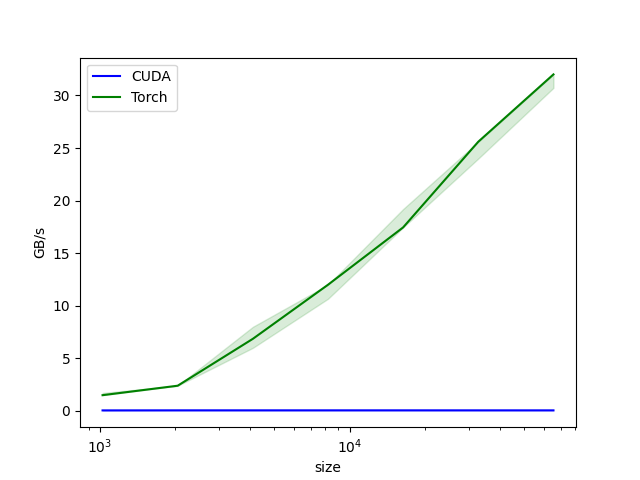
As expected naive CUDA kernel does not perform well. If someone want to write a custom kernel for this function I highly recommend a blogpost "Learning CUDA by optimizing softmax: A worklog" by Maharshi Pandya. It showcases all optimizations that can be done in order to get best performance. Second resource that I can recommend is a video by Simon Oz titled "How to write a fast Softmax kernel".